Planner Studio Walkthrough
Use Planner Studio when a request needs planning before code changes. The studio walks through three steps: Define & Context, Review Plan, and Execution.
Before You Start
Check that:
- The repository exists in the Web UI.
- The repository entry's configured branch is correct. Planner Studio plans and runs against that branch; it cannot be changed inside the studio.
- At least one coding agent is enabled.
- The request is specific enough to plan.
For branch behavior, see Branch Configuration.
Step 1: Define & Context
- Open Planner Studio and create a new draft.
- Select the repository.
- Write the request in the prompt field. Paste or drag-and-drop attachments (screenshots, files) directly into it.
- Keep Smart File Selection enabled to let ProPR pick the relevant files, or adjust the selection yourself.
- Choose a granularity:
- Single — one issue for the whole request
- Balanced — 3–5 issues (recommended)
- Granular — 7–15+ small issues
- Choose a context level: Focused, Expanded, or Full Scan, trading context size against coverage.
- Optionally add Additional Context Repositories so the planner can read related repositories (for example a shared API client) while planning this one.
Keep the initial request focused. If it contains several unrelated goals, split it before generation.
The cost preview estimates the plan-generation cost and auto-refreshes as you change inputs; pause the refresh while editing if you prefer. Use Export Context to download exactly what would be sent to the model and inspect it before spending anything.
When the inputs look right, generate the plan. You can abort generation while it runs.
Step 2: Review Plan
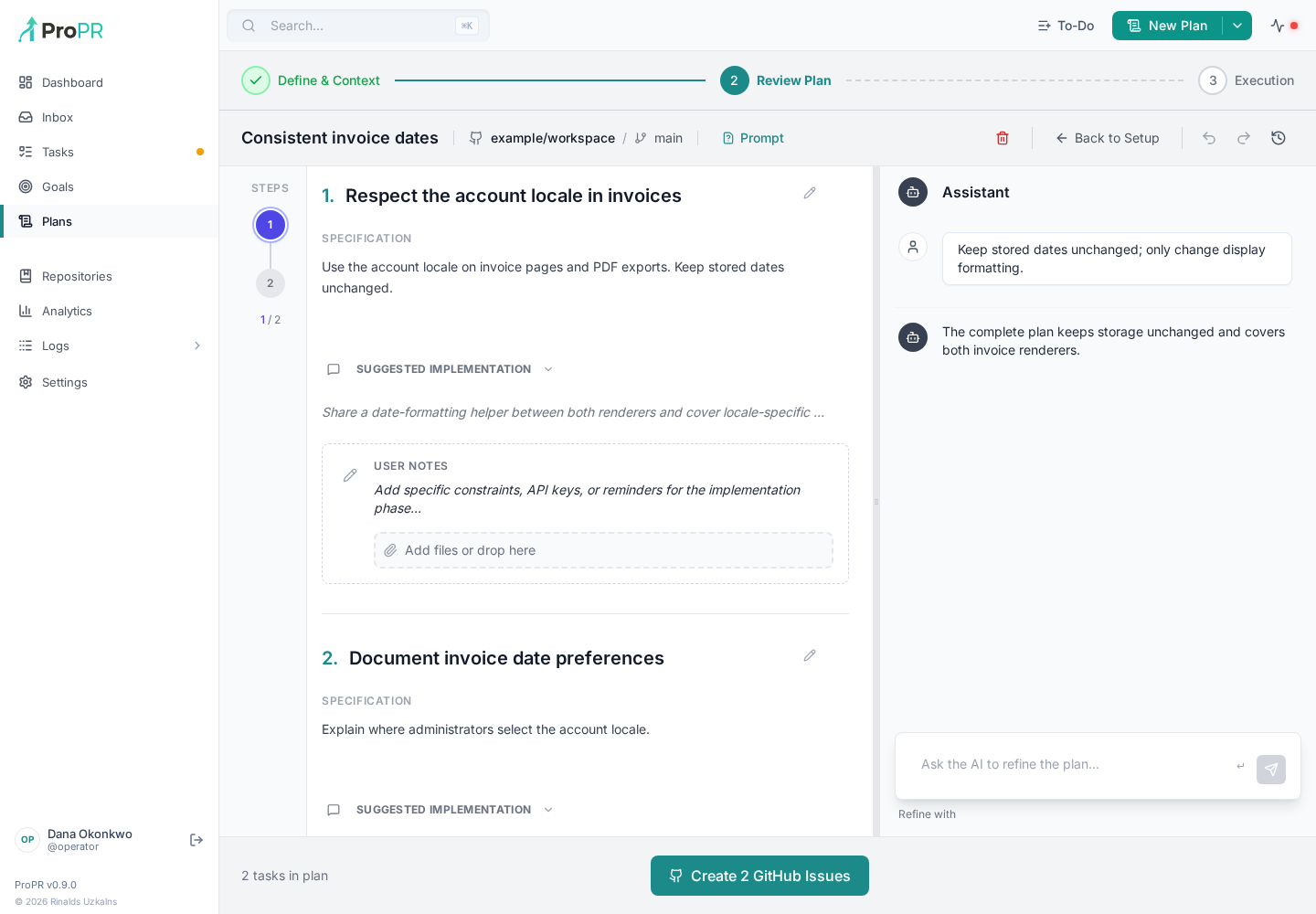
Review the generated plan like a proposal:
- Edit issue titles, bodies, and acceptance criteria directly in the plan editor.
- Use the refinement chat to ask for changes ("merge steps 2 and 3", "add a migration issue") instead of regenerating from scratch.
- Remove unnecessary work.
- Split large steps into smaller issues.
- Keep risky refactors out of small feature work.
- Regenerate if the plan misunderstood the goal.
Planning is the best point to keep work reviewable. When the plan is ready, finalize it with the Create N GitHub Issues button; ProPR creates one GitHub issue per plan item.
Step 3: Execution
Configure how the created issues run:
- Pick the agent and model per issue.
- With two or more issues, enable the multi-model comparison toggle to run an issue with several models (one branch and PR per model), and use Apply to All to copy the selection to every issue.
- PR options:
- Auto-merge if checks pass — merge each PR automatically once CI is green.
- Epic PR (two or more issues) — combine the issues' results into a single epic pull request. The issues run one after another in plan order through a durable queue: the next issue starts only after the previous one finishes.
- Run ultrafix after PR — start a review-fix loop on each PR, with a goal score and maximum cycle count.
Start execution, watch the task records in the Web UI, and review the created pull requests. For larger changes, run one planned issue first and review the result before launching the rest.
CLI Equivalent
The same flow is available from the propr CLI:
propr plan create "<request>"
propr plan generate <plan-id>
propr plan finalize <plan-id>
propr plan abort <plan-id>
propr issue implement <plan-id>/<issue-number> --epic --auto-merge
See ProPR CLI for the full command reference.
If The Plan Goes Wrong
- Refine the plan in the Review Plan chat if the goal is still right but the plan is weak.
- Go back to Define & Context if repository, context level, or attachments were wrong.
- Split the work (higher granularity) if the plan is too broad.
- Add better context — more attachments, a wider context level, or additional context repositories — if the plan is generic.
Related pages:
Recover an earlier plan
Use Plan history in the review editor to preview and restore an earlier snapshot. Restoring preserves the version it replaces. See revision history and refinement before finalizing the plan.