Visual Previews
Visual previews let a ProPR implementation show its user-visible result directly in the generated pull request. The same policy applies to later follow-up commits, whose completion comments can include fresh media focused on that follow-up.
The feature is opt-in per repository. Existing repository configurations remain disabled after an upgrade.
GitHub attachment uploads require a GitHub OAuth App token (gho_) or personal
access token. GitHub's uploader rejects both GitHub App user (ghu_) and
installation (ghs_) tokens even though those tokens work for normal GitHub API
operations. When an instance administrator's Web UI login is backed by a GitHub
OAuth App, ProPR automatically stores its compatible credential, encrypted in
the shared database. Open Settings → Visual preview uploads to see which
account is connected or explicitly replace it with the current administrator
login. Normal GitHub API, commit, and pull-request operations continue to use
the GitHub App installation token.
When normal Web UI login uses a GitHub App, an administrator can instead paste
a personal access token in Settings → Visual preview uploads. ProPR validates
the token with GitHub and encrypts it before storing it. No CLI, callback URL, or
service restart is required. For a fine-grained token, choose the organization or
user that owns the repositories as the resource owner, include every
preview-enabled repository, and grant the repository permission Pull requests:
Read and write. GitHub adds read-only metadata access automatically; no other
repository permission is required. The token owner must have push access to the
repositories and must complete any organization approval or SAML SSO authorization.
Fine-grained tokens can target only one resource owner. If the repositories span
multiple owners, use a classic PAT with repo, or public_repo if every repository
is public. Settings links to GitHub's token form with the fine-grained permission
preselected.
Expiring OAuth credentials are refreshed on API startup and every 30 minutes
while the stack is running. Each successful refresh rotates the access and
refresh tokens, so an administrator does not need to sign in every six months
while the stack can keep refreshing them. A revoked grant, an expired unused
refresh token, or a changed encryption secret requires a fresh administrator
login. Personal access tokens are not refreshable OAuth grants; replace a
revoked or expired PAT in Settings → Visual preview uploads. As an advanced
server-managed alternative, configure GITHUB_VISUAL_PREVIEW_TOKEN with an
OAuth App token, classic PAT, or fine-grained PAT belonging to a user with write
access to every preview-enabled repository.
propr setup also reuses an upload-compatible token from an existing gh CLI
session when no working preview credential is already configured. GitHub CLI
does not expose a refresh token to ProPR, so an expired or revoked imported token
must be replaced in Settings or re-imported by running setup again.
Configure A Repository
On Repositories, open the repository settings and turn on Visual previews. Choose Images, Videos, or both, then optionally add capture instructions such as:
Capture separate desktop and mobile views. Open the new settings dialog and focus the changed controls.
The setting is repository-wide. If the same repository has entries for multiple base branches, ProPR keeps their preview policy synchronized.
The CLI exposes the same policy:
propr repo add owner/repo --visual-previews --preview-types image,video \
  --preview-instructions "Capture desktop and mobile views."
propr repo toggle owner/repo --visual-previews --preview-types image
propr repo toggle owner/repo --no-visual-previews
What The Agent Captures
When enabled, the implementation agent evaluates the completed change:
- If the result is perceptible visually, it captures the changed state with relevant project tooling such as Playwright, Storybook, a browser, an emulator, or a project-native renderer.
- If the change has no visible result, it does not create placeholder media.
- Captures focus on the change rather than generic application screens and must not contain credentials, personal data, or unrelated content.
- If capture is blocked, the agent can recommend the concrete browser, emulator, or media tool that should be added to the agent image.
Agents generate media under the transient .propr/previews/ runtime directory and may use .propr/preview-src/ for preview-only source material. Optional titles, descriptions, and tool recommendations are recorded in .propr/previews/manifest.json. Before committing, ProPR copies accepted files to worker-owned temporary storage and removes both runtime directories from the worktree. A second safeguard at the commit boundary excludes them from work output, so preview artifacts are never included in the implementation commit.
Supported image formats are PNG, JPEG, GIF, SVG, and WebP. Supported video formats are MP4, MOV, and WebM; H.264 MP4 is the most broadly compatible choice. GitHub inline publication limits and original-evidence staging limits are separate, as described below.
Publication And Upload Failures
ProPR publishes eligible previews as GitHub attachments so images render inline and videos use GitHub's media presentation. Plus installations with managed storage also publish an authenticated ProPR Connect link to the finalized full-resolution original. For follow-ups, it uploads the media first and then updates the existing progress comment; it does not create a temporary second comment. ProPR verifies that no temporary local path remains in the published body, then deletes the temporary files only after managed storage, GitHub upload, and the final publication or fallback have settled. If an upload fails, ProPR publishes the available trusted result plus a safe explanation; preview media is not added to Git as a fallback. When the failure is a missing, unsupported, expired, or rejected user credential, that explanation includes the Settings reconnection steps in the affected pull request. Originals are normal authenticated links, never inline images or presigned object-store URLs, and can remain available when an attachment exceeds the inline limit.
Preview generation is evidence, not a replacement for automated tests. A preview failure does not discard an otherwise valid implementation; the PR explains missing tool support when the agent can identify it.
GitHub attachment capacity
Each repository has a GitHub attachment plan setting under its visual-preview controls:
auto(default): best-effort detection of the attachment uploader's account plan usingGET /userwith the already-configured upload credential. Detection applies only when the repository owner matches the authenticated user. Only recognized, explicit paid plans enable larger videos.free: enforce Free limits regardless of detection.paid: explicitly enable paid video capacity for this repository.
PNG, JPEG, GIF, SVG, and WebP images always have a 10 MiB inline attachment limit. MP4, MOV, and WebM videos have a 10 MiB limit for Free and 100 MiB for paid. Other content types are unsupported. GitHub publishers validate every inline candidate against these limits before any GitHub request; GitHub can still reject an eligible upload.
Original-evidence staging has its own safety capacity. Without a managed-storage capability, it defaults to the legacy image and video limits above. A trusted runtime resolver can supply originalEvidenceCapability.maxBytes from managed storage; staging honors that maximum, capped at 500 MiB per original, independently of the GitHub plan. This capability is never accepted from stored repository settings. Prepared evidence retains supported originals within that safety limit and includes their size and structured githubInline eligibility/reason, even when they cannot be uploaded inline. The agent prompt describes both limits separately. The managed publisher links finalized originals independently of inline eligibility; it does not resize originals to fit GitHub.
If credentials are absent, GitHub omits the plan, or the API is ambiguous or unavailable, auto reports Auto unresolved; using conservative Free limits. Detection does not request broader OAuth scopes, GitHub App permissions, billing access, or changes to Connect. Organization membership and repository visibility do not establish the uploading account's paid status.
The repository settings API exposes visualPreview.githubAttachmentPlan and the read-only visualPreview.githubAttachmentCapacity (detected/effective plan, resolution source, and byte limits). Only the override is persisted; the server recomputes capacity. propr repo list displays the override and resolved limits. To change it:
propr repo toggle owner/repo --github-attachment-plan paid
propr repo toggle owner/repo --github-attachment-plan auto
This policy does not change staging: .propr/previews and .propr/preview-src remain transient runtime directories and are removed before commit.
Managed Original Storage (Plus)
Settings → Integrations & MCP → Visual preview uploads also shows managed preview
storage availability. ProPR uses the existing Connect account_status Plus
entitlement, a live routing connection, and Connect's storage-enabled status.
Community installations, offline Connect connections, and relays without the
storage endpoints continue to publish GitHub attachments.
When available, the worker stores the exact accepted evidence bytes before GitHub inline selection and publication, so originals can be stored even when they exceed GitHub attachment limits. A finalized artifact contributes only its stable, authenticated Connect viewer URL; presigned object URLs and object keys never enter publication metadata. Storage failures do not interrupt eligible GitHub uploads. The standard installation quota is 25 GiB, maximum original object size is 500 MiB, and retention is 90 days. Settings display the server's effective values when available; otherwise these standard values are explicitly labeled as defaults. Managed originals use the server-reported object and quota limits independently of GitHub inline capacity. The hybrid publisher links every successfully finalized original and includes a GitHub attachment only when a fresh file check fits the resolved capacity. Consequently, an oversized video can publish as an authenticated-original link without transcoding; the attachment plan setting above controls paid-plan video inline capacity. The override never grants Plus or raises Connect limits. Managed storage does not replace the GitHub attachment credential.
The administrator-only GET /api/config/preview-storage API returns
{ version: 1, state, enabled, effective }. state is enabled, plus_required,
disabled, or unavailable. effective contains validated server limits or
null; credentials, presigned URLs, and viewer tokens are never included.
The relay API and client contract are documented in Preview storage relay contract.
Publication outcomes
| Situation | What reviewers see |
|---|---|
| Plus, original finalized, GitHub upload succeeds | Inline GitHub media and an authenticated original link with retention expiry. |
| Plus, original finalized, GitHub size limit or upload failure | Authenticated original link and inline-unavailable text. |
| Quota exceeded, upload/object expired, or Connect unavailable | Eligible GitHub media remains available; managed evidence gets fallback text. No expired grant or expired original is linked. |
| Community or older relay without storage endpoints | Existing GitHub-only behavior and size limits; upload failure produces text with no local links. |
| No visible change | No preview is generated. |
Private repository originals require Connect sign-in and repository authorization on every viewer request. Possession of the URL does not grant access. Retention expiry removes access to the original; it does not remove an independently published GitHub attachment. Connect viewer authentication and deletion are server responsibilities; the client validates the trusted origin, metadata, and future retention timestamp before publishing a link.
See managed preview operations for quota recovery, offline behavior, log handling, and release validation.
View previews and recover private images
Task and goal details show published previews beside the work that produced them. Select an image to open the lightbox; double-click to zoom, use arrow keys to move between images and Escape to close it. Videos use their playback controls. MCP clients can list a task's or pull request's published previews with list_visual_previews and fetch a downscaled image with get_visual_preview; videos are metadata only there and open on GitHub.
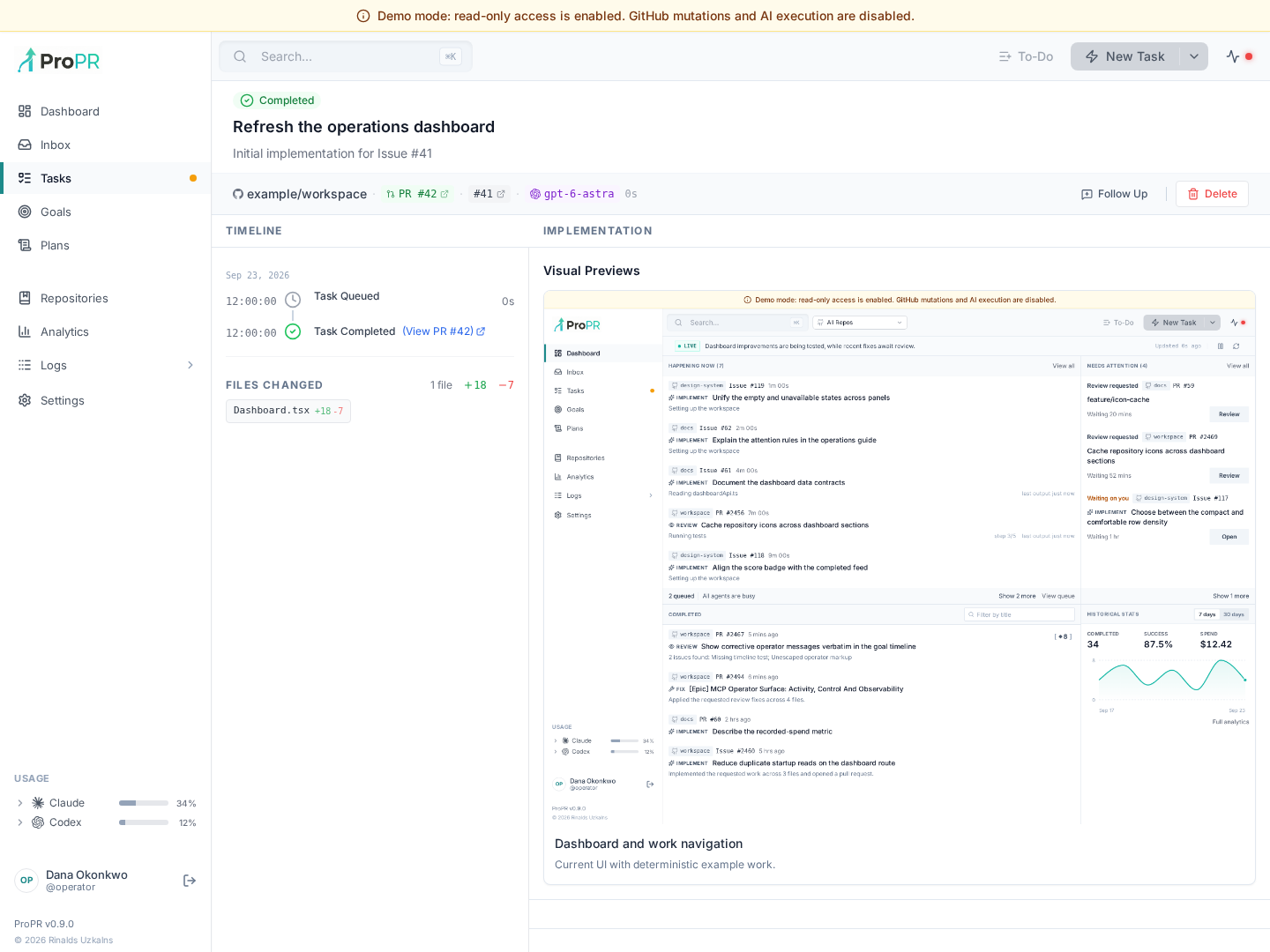
Private GitHub attachments use ProPR's authenticated media endpoint, including through the desktop network boundary. If an image is unavailable, follow the displayed diagnostic and check that the current GitHub authorization can read that repository and PR. Reauthenticate with GitHub when requested; a public attachment URL alone does not grant access to private evidence. Managed-original viewer links have their own Connect sign-in and repository authorization requirements. See Desktop troubleshooting for the distinction between GitHub reauthorization and re-pairing an instance.