MCP Connections and Operator Tools
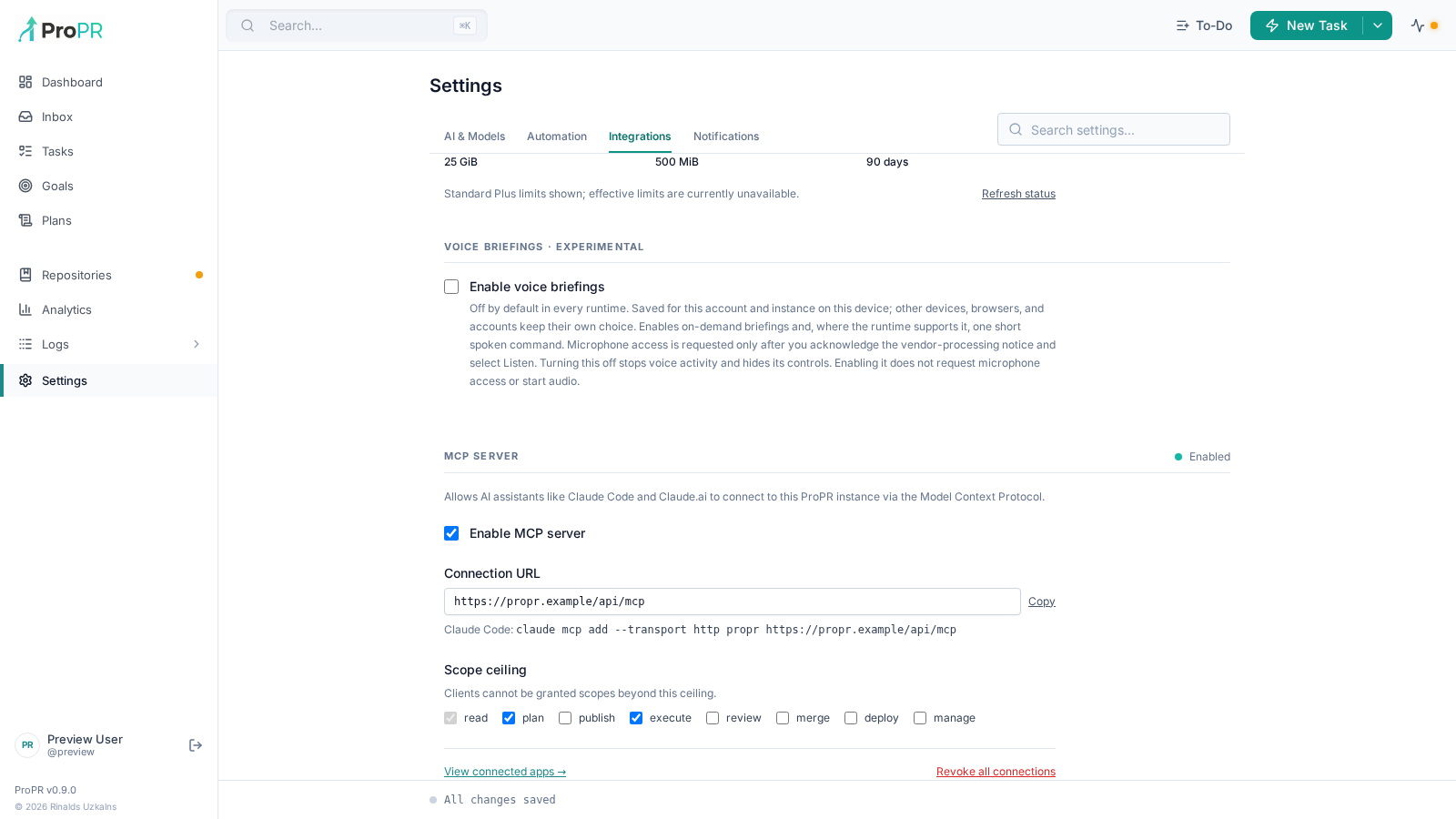
MCP lets a connected coding or chat client inspect and operate ProPR using scoped authorization. It is disabled by default. Administrators use Settings → Integrations & MCP → MCP Server to manage enablement and the allowed scope ceiling (default: read, plan, review). The UI-managed path derives an HTTPS origin and encryption key from existing instance configuration and persists an instance identity. An explicit MCP_ENABLED=true selects environment-managed configuration, where the settings page shows the status but no toggle or ceiling; false prevents UI enablement. Missing configuration is shown as a setup problem; demo mode cannot enable MCP.
Consent and connected apps
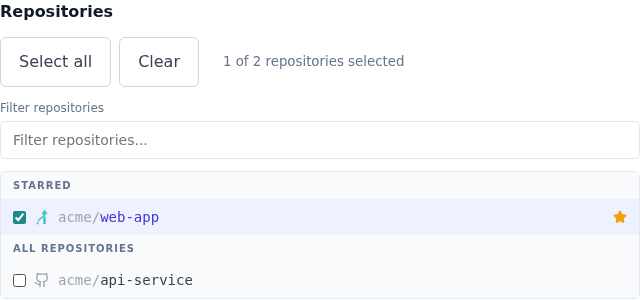
Connect the client to the instance's /api/mcp endpoint. Sign in through the browser and review the requested permissions and repository selection. Optional scopes begin unchecked. Select only the requested capabilities and repositories you intend to grant; refresh cannot expand the grant. A rejected GitHub session returns you to sign-in.
The repository picker shows familiar repository icons, starred repositories, a name filter and selection counts. Filtering does not clear a selected repository.
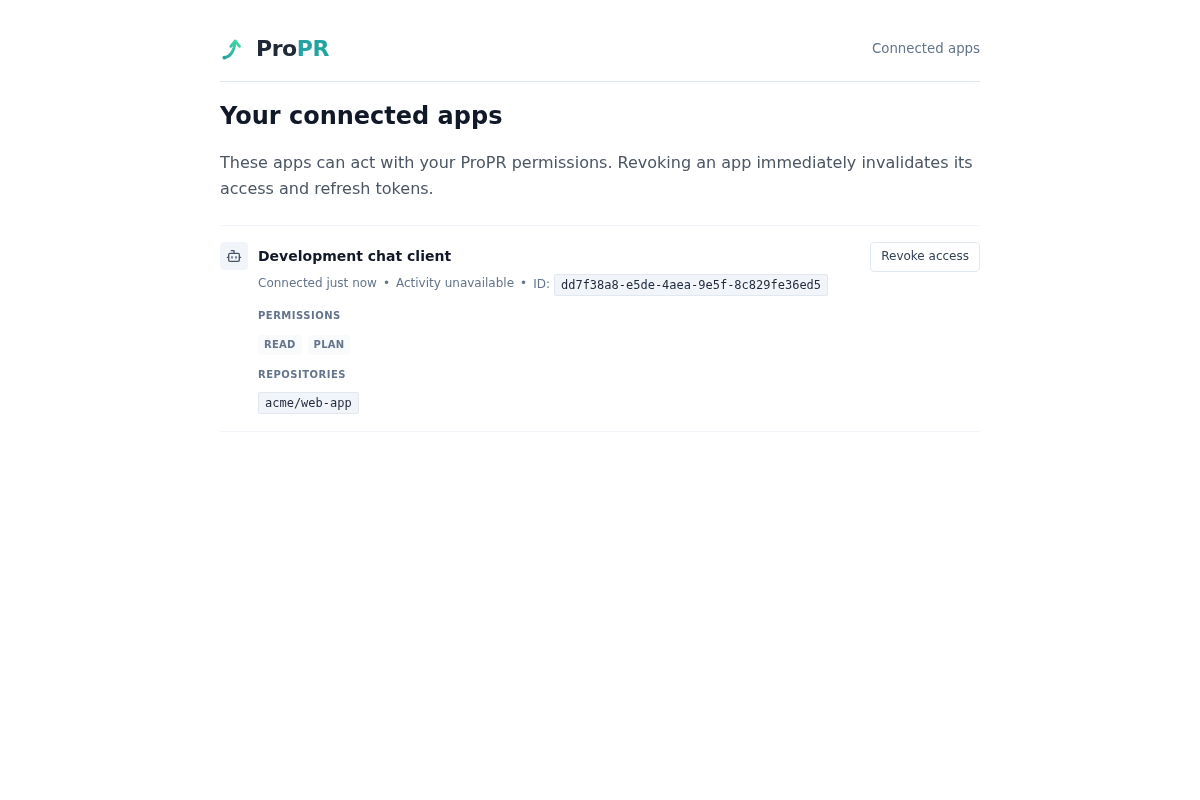
Open Connected apps (/mcp/apps) to inspect grants and revoke access. The list shows repository access, permissions, last use and request counts. Administrators can inspect Logs → MCP Log for tool/resource names, outcomes, timing and operation handles; arguments and result bodies are excluded from the log.
Common operator workflows
| Need | Tools |
|---|---|
| Current work and blockers | get_current_activity |
| Tasks joined to their pull request's head, review, checks and ultrafix state | get_work_overview |
| Finished work in a recent window | get_recent_activity (up to seven days) |
| Goal progress and corrections | get_goal, wait_goal, list_goal_inputs, list_goal_attention |
| Tasks or goals by lifecycle | list_tasks, list_goals with state and optional repository; list_tasks also takes assignee (me, unassigned or logins) |
| Plans by status | list_plans with status: active, an exact persisted status, or all (default) |
| Ideas for what to work on next (the Improve tab) | generate_repository_improvements, then get_operation for result.suggestions |
| Start a bounded change | create_task, then get_operation or get_task_submission |
| Your recent task submissions and how far each got | list_task_submissions with optional repository and stage |
| Start a goal | get_goal_capabilities, then create_goal |
| Review a pull request, with one or several models | review_pull_request with optional model |
| Publish or remove a plan | publish_plan, delete_plan |
| Run a saved automation and read its report | list_automation_definitions, trigger_automation_run, then get_operation or get_automation_run; approve_automation_run/reject_automation_run for runs awaiting approval (preview runs, and auto runs the cost gate paused) |
| Find what you started and whether it finished | list_operations, then get_operation |
| PR inventory and review fixes | list_pull_requests, fix_review_findings with findingIds and/or suggestionIds |
| Visual previews published for a task or PR (images; videos are metadata only) | list_visual_previews, get_visual_preview |
| Screenshots embedded in a PR/issue comment or description (images; videos are metadata only) | get_pull_request_discussion attachments, then get_comment_attachment |
| Turn on the assignment gate | update_execution_settings with followup_requires_assignment: true (default false); get_execution_settings reads it |
| Automatic pull request assignment for a repository | update_repository_configuration with autoAssignPullRequests, autoAssignDefaultAssignee and autoAssignRequestReview; get_repository_configuration reads them |
| Product docs and where a setting lives | search_docs, get_doc, find_setting |
| Find and read code in a granted repository without cloning it | search_repository_files (mode: "semantic" ranks paths from the index; mode: "literal" greps exact text with line previews), then read_repository_file in bounded line ranges |
The assignment fields are all off by default and need instance.manage_settings:
| Tool | Field | Type | Default | Effect |
|---|---|---|---|---|
update_execution_settings | followup_requires_assignment | boolean | false | Only people assigned to a pull request may start follow-up work on it by commenting. Unassigned pull requests are unaffected. |
update_repository_configuration | autoAssignPullRequests | boolean | false | Assign ProPR pull requests when work on them completes. Applies to every branch entry of the repository. |
update_repository_configuration | autoAssignDefaultAssignee | GitHub login or null | null | Who to assign. null clears it, so the source issue author is assigned and bot authors are skipped. |
update_repository_configuration | autoAssignRequestReview | boolean | false | Also request a GitHub review from the assignee. |
Omitted fields keep their stored values.
search_repository_files returns paths only. Its default semantic mode uses
the repository index and reports freshness. If the branch has not been
indexed, indexing is running or failed, or the index was built from an older
(or unrecorded) commit, the search still answers, but marks the result stale
with a caveat.
Re-index the branch with index_repository if the caveat matters. Literal mode
greps the exact commit and needs no index. An empty result means no match, not
an error. read_repository_file returns at most 800 lines (or maxLines, up
to 1000) and 120000 bytes (or maxBytes) per call. A capped read sets
truncated: true and nextStartLine for the next call. Both tools report the
commit they read; pass it back as ref to keep a multi-step lookup on one
snapshot. Binary files, paths with .., and repositories outside the grant
are rejected with BINARY_FILE, INVALID_PATH and REPOSITORY_FORBIDDEN.
create_goal accepts ultrafix: true to have the agent run Ultrafix before
delivery; it never merges or grants merge authority. maxParallelTasks (1–32)
caps the goal's concurrent tasks and defaults to 1 over MCP. A
checkpointIntervalMinutes value (5–120, default 15) is valid only for direct
goals. get_goal_capabilities returns the same rules as creation.
review_pull_request takes model as one alias or a list of up to eight; each
model posts its own independent review, exactly like several /review <model>
comments. Unknown or disabled aliases (UNKNOWN_MODEL) and aliases that resolve
to the same model (DUPLICATE_MODEL) are rejected before anything is posted,
and the pull request's model labels never change. get_operation tracks each
review. review_pull_request, fix_review_findings, run_ultrafix and
comment_on_pull_request accept an optional expectedHead: without it they act
on the head at call time and report it as resolvedHead; with it a moved head
fails with STALE_HEAD.
publish_plan needs the plan's exact expectedRevision. If publication fails
partway, call it again with resume: true to continue from the issues already
created instead of creating them twice. delete_plan deletes a plan that is
idle (draft, review, approved) or finished (failed, merged); plans that are
generating, refining or executing published work return PLAN_NOT_DELETABLE.
Its expectedRevision is optional, and a stale one returns STALE_REVISION.
implement_plan with useEpic: true runs selected issues sequentially in plan
publication order. It starts one issue and durably queues the rest, using one
model per issue. epicExecution: "parallel" restores fan-out (up to four
models) and labels the epic PR once every issue finishes; non-epic calls keep their existing fan-out. epicAdvanceOn: "merged"
is the default: closed or failed heads record a blockedReason and wait until
fixed and merged. epicAdvanceOn: "terminal" advances on any core terminal
issue state. pause_plan holds the successor and resume_plan starts it.
get_plan and get_operation expose the queue's issues, cursor, head, status,
advanceOn and blockedReason. The result reports executionMode, started and
queued; a sequential receipt remains accepted until the queue completes.
Unselected pending issues never start through the queue.
Mutations require their corresponding scopes and repository access, and return durable receipts. Queue acceptance is not completion. Keep idempotency keys stable when retrying the same request, and repeat its arguments exactly. Failures return a structured error with a stable code, the stage where it failed and whether it is retryable. See the full operator/setup reference and tool coverage for schemas, Connect registration and deployment requirements.