Goals
Goals keep a coding-agent session working toward a continuing objective. Use a task for a single bounded request, or a plan when you want to approve the issue breakdown first.
Goals retain an objective, provider session, goal branch, and delivery history across execution attempts. Choose a configured, goal-capable agent when creating a goal. ProPR probes the configured runtime before accepting it.
Which agents run goals
| Agent | Goal support |
|---|---|
| Claude Code | Native goal execution. Corrections reach the running session live. |
| Codex | Native goal execution. Corrections reach the running session live. |
| Antigravity CLI | Native goal execution with resumable sessions. ProPR resumes the same session after checkpoints; corrections and pause apply at the next safe boundary. |
| OpenCode, Mistral Vibe | Not supported. Use tasks or plans with these agents. |
Synthetic pools cannot run goals. Availability is also checked against the configured runtime image: an agent listed for ordinary tasks is not necessarily goal-capable in your installation. If no goal-capable agent is available, use the capability diagnostics and recheck after updating the runtime.
Start and monitor a goal
- Open Goals, choose New Goal, then select a repository.
- Enter the objective in Prompt and attach supporting material. Respect the character limit shown for the selected provider.
- Under Advanced Options, choose a goal-capable agent and model, a launch strategy (see below) and, optionally, the maximum number of parallel tasks and whether the agent runs Ultrafix before it finishes. Choose Start goal and open it from the work queue.
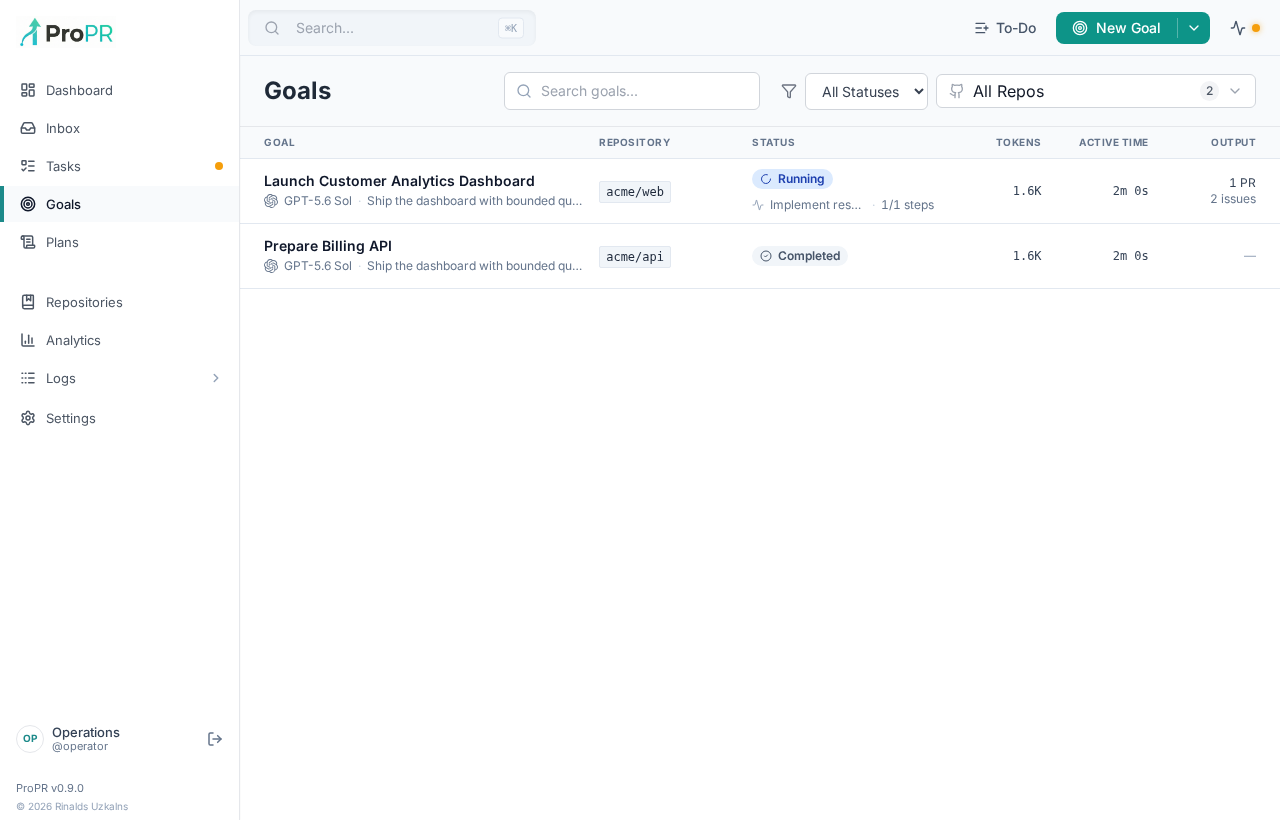
The detail console brings together context, current activity, progress, artifacts, logs and published visual previews. Repository and status filters narrow the queue. A finished task is distinct from a finished goal; use the goal's result and final PR to assess completion.
Launch strategies
Direct (agent implements directly). The agent works in the goal workspace. ProPR opens a draft PR on the goal branch and owns every commit and push. When a coherent set of changes is ready, the agent requests a checkpoint; ProPR validates the listed paths, commits only that scope, pushes, records the commit and publishes current visual previews to the draft PR. The Checkpoint target cadence defaults to roughly every 15 minutes and can be set from 5 to 120 minutes. It is guidance to the agent, not a timer that interrupts it.
Orchestrate through ProPR. The agent decides how to break the objective down, creates GitHub issues, and starts and monitors their implementation through ProPR, optionally building an epic PR from the resulting PRs. It must track every issue and PR it creates and finish with a validated draft PR containing the final implementation.
In both strategies, max parallel tasks is a limit the agent enforces itself; ProPR does not schedule a plan graph for goals. With Ultrafix enabled, the agent runs Ultrafix as part of delivery before declaring the goal complete; with it disabled, the agent runs Ultrafix only if a later correction asks for it. Ultrafix does not merge: the goal still ends with a draft pull request. The web UI, API and MCP's create_goal share the same limits: 1–32 parallel tasks, and a checkpoint cadence of 5–120 minutes for direct goals only.
Corrections, pause and cancel
Send a correction from the goal console or through MCP's send_goal_input to steer the existing session. The timeline records your message verbatim so you can distinguish operator input from agent output. All three deliver it into the running goal: Codex and Claude over their live control channels, and Antigravity by stopping at the next finished step and resuming the same conversation (see below). A queued input is not proof that the agent has already acted on it.
Pause, Resume and Cancel also follow provider boundaries. A pending pause or cancellation can take time to acknowledge; watch the displayed state. Model changes apply at a boundary. Terminal goals no longer accept corrections.
Goals are launched and managed from the Web UI, the ProPR CLI or MCP. All three use the same owner-scoped controls and status projection:
| Action | CLI | MCP |
|---|---|---|
| Check which agents can run goals | propr goal capabilities | get_goal_capabilities |
| Create and start a goal | propr goal create | create_goal |
| List goals | propr goal list | list_goals |
| Progress, current activity, checkpoints, pending input, PRs | propr goal inspect <id> | get_goal |
| Wait for a confirmed state or a new checkpoint, with a deadline | propr goal wait <id> --until <condition> | wait_goal |
| Send a correction or question | propr goal input <id> | send_goal_input |
| Earlier inputs and their delivery state | propr goal inputs <id> | list_goal_inputs |
| Goals waiting on you, and what resolves each | propr goal attention | list_goal_attention |
| Pause, resume, cancel | propr goal pause|resume|cancel <id> | pause_goal, resume_goal, cancel_goal |
| Change the model | propr goal model <id> <model> | set_goal_model |
A typical terminal session:
propr goal create -p owner/repo -a codex -m <model> --file objective.md   # starts work; prints the goal ID
propr goal inspect <goal-id>
propr goal input <goal-id> "Keep the public API unchanged"
propr goal pause <goal-id>
propr goal resume <goal-id>
propr goal model <goal-id> <model>
propr goal wait <goal-id> --until terminal --timeout 3600   # exits 0 when finished, 2 at the deadline
propr goal inspect <goal-id> --json   # final PR in goal.finalPr and goal.pullRequests
Waits read the goal's durable event journal, so they only match persisted, confirmed states: a requested pause or cancellation, a finished child task or an idle agent never counts. See Waiting for a goal for conditions, cursors and exit codes.
Mutations accept an idempotency key, so retrying a create or input never starts a second goal or queues a duplicate correction.
When a goal needs you
A goal that is waiting on you shows a Needs you panel in the goal console, a badge in the goal list, an item in the dashboard's Needs attention list, and an entry in propr goal attention and MCP list_goal_attention. All of them read one shared projection, so they agree on what is needed, why, and which action resolves it.
Only explicit signals count:
- Paused — the goal confirmed a pause and no resume is queued. Resume it, or send input.
- Question — the provider sent a structured question. Send goal input to answer; ProPR delivers it as the reply. While several questions wait, a goal input cannot name the one it answers, so none is offered a direct answer until only one remains. The question clears when the provider confirms it, not when you send.
- Approval — the provider sent a structured approval request. ProPR never approves for you; pause or cancel the goal to hand it off.
Silence, slow work, rate limits, infrastructure failures, the agent's narration and corrections you have queued never raise one. Blockers are tied to the execution attempt that raised them: if the worker recovers the goal onto a new session, or the goal finishes, they are closed and cannot reappear.
| Provider | Questions | Approvals |
|---|---|---|
| Codex | Supported | Reported; pause or cancel to hand off |
| Claude | Not available (headless, permissions bypassed) | Not available |
| Antigravity | Not available (print mode, permissions bypassed) | Not available |
Confirmed pauses are reported for every provider.
Antigravity goals
ProPR launches an Antigravity goal with the CLI's native /goal command, sent together with ProPR's delivery context. Antigravity then owns the goal loop: it keeps working until it marks the goal complete. ProPR saves the conversation ID from the first stream event and mounts persistent Antigravity configuration for goals; ordinary tasks keep disposable state.
The CLI's print mode holds new messages until a goal finishes, so ProPR reaches control boundaries itself. When a checkpoint is declared, input is sent, or a pause, cancel or model change is requested, ProPR interrupts at the next finished step. It then resumes the exact conversation, where the goal is still set, with the checkpoint acknowledgement or your message. Resumed messages are sent with slash commands disabled, so they reach the conversation verbatim.
The stream supplies live narration to goal details and get_agent_activity. A goal completes only when Antigravity marks it complete; a turn that ends without that mark is nudged to continue, and repeated unexplained stops fail the goal. The capability check requires the pinned CLI to expose --print, --output-format, --conversation, --disable-slash-commands and the built-in /goal command.
Checkpoints and controls
For direct implementation, ProPR prepares the branch and opens the draft PR before agent execution. The agent edits the prepared worktree and requests checkpoints by ending its turn with JSON:
{"checkpointReady":true,"message":"feat(example): implement the next coherent change","summary":"Describe the completed work."}
Optional include and exclude arrays select repository-relative files. ProPR validates, commits, pushes, and records the checkpoint, then resumes the conversation with acknowledgement. The agent must leave Git operations and PR creation to ProPR.
Completion
ProPR publishes the final direct-implementation checkpoint and validates an open draft PR on the saved goal branch against the expected base branch. A provider saying it is finished, or reporting a different PR, cannot bypass this validation. Inspect goal details for checkpoint, input-delivery, and final PR evidence.
When validating a runtime upgrade, run a disposable goal through creation, activity, a checkpoint, operator input, pause/resume, cancellation, and successful final draft PR validation. Unit tests and CLI help probes alone do not establish that the authenticated integration works end to end.